


In addition to client-side events, WebFileUploader also provides comprehensive server-side events, making it easy for developers to customize and extend the control with additional processing on certain event.
WebFileUploader is designed with sophisticated architecture that enables server-side events to be raised properly, although WebFileUploader doesn't have direct access to the Page object due to the nature of its architecture that used more advanced HttpModule/HttpHandler technology instead of old-fashioned AJAX.
The following lists server-side events available in WebFileUploader.
- Uploading.
Fired when a file upload is in progress. This event will be invoked continuously during the upload progress.
- AfterUpload.
Fired when a file upload is succeeded.
- CancelUpload.
Fired when a file upload is cancelled.
- ErrorUpload.
Fired when a file upload is failed due to error.
All server-side events receive WebFileUploaderFileEventArgs parameter that contains information about an upload file in the context.
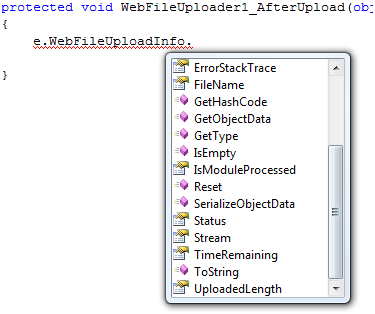
The WebFileUploadInfo object provides complete information about an upload file,
such as file name, status, error message and more.
The following C# example shows how to move the uploaded file to another folder after a successful file upload.
 See Also
Other Resources
{Large files uploading with minimal resources consumption}
{IIS 6 and IIS 7 Integrated mode support}
{Webfarm and multiple worker requests support with built-in FileStateServer}
Rich user experiences
{Built-in file saving}
{Real-time progress bar}
{Upload}
{Client-side events}
{Initial files count}
{Limit upload files by type, count, or custom}
{Limit upload size and total upload size}